




This is a short introduction to ClassicOT. It will provide you with general instructions on how to set up the game and to start playing.
1. How to Start
To play ClassicOT you need to create an account first. Simply click on sign up and follow the instructions. Once you have entered your desired account number go to my account and create your character.As a next step please download the client software and unpack it on your computer.
Once ClassicOT is installed you have to create your first character. Click on "My Account" on the left hand side of the webpage and log in using your account number and password. On your account page scroll down to the character section and click on the button "Create new character". Select your character's name, gender and the game world you want to play on.
Please make sure that you choose a name for your character that does not violate the ClassicOT Rules. Of course, you have to follow this code of conduct while playing and using our website at any time. Otherwise, you may be excluded from our game service.
Now you are ready to start playing. Go to your windows desktop and double-click on the ClassicOT icon to start the game client. On the title screen simply click on "Enter Game". Once you have entered your account data correctly a menu will be displayed. Double-click on the name of the character you have created. Then the client will connect to the game server and your character can start his career as an adventurer.
2. Screen Layout
You will now see the adventure screen: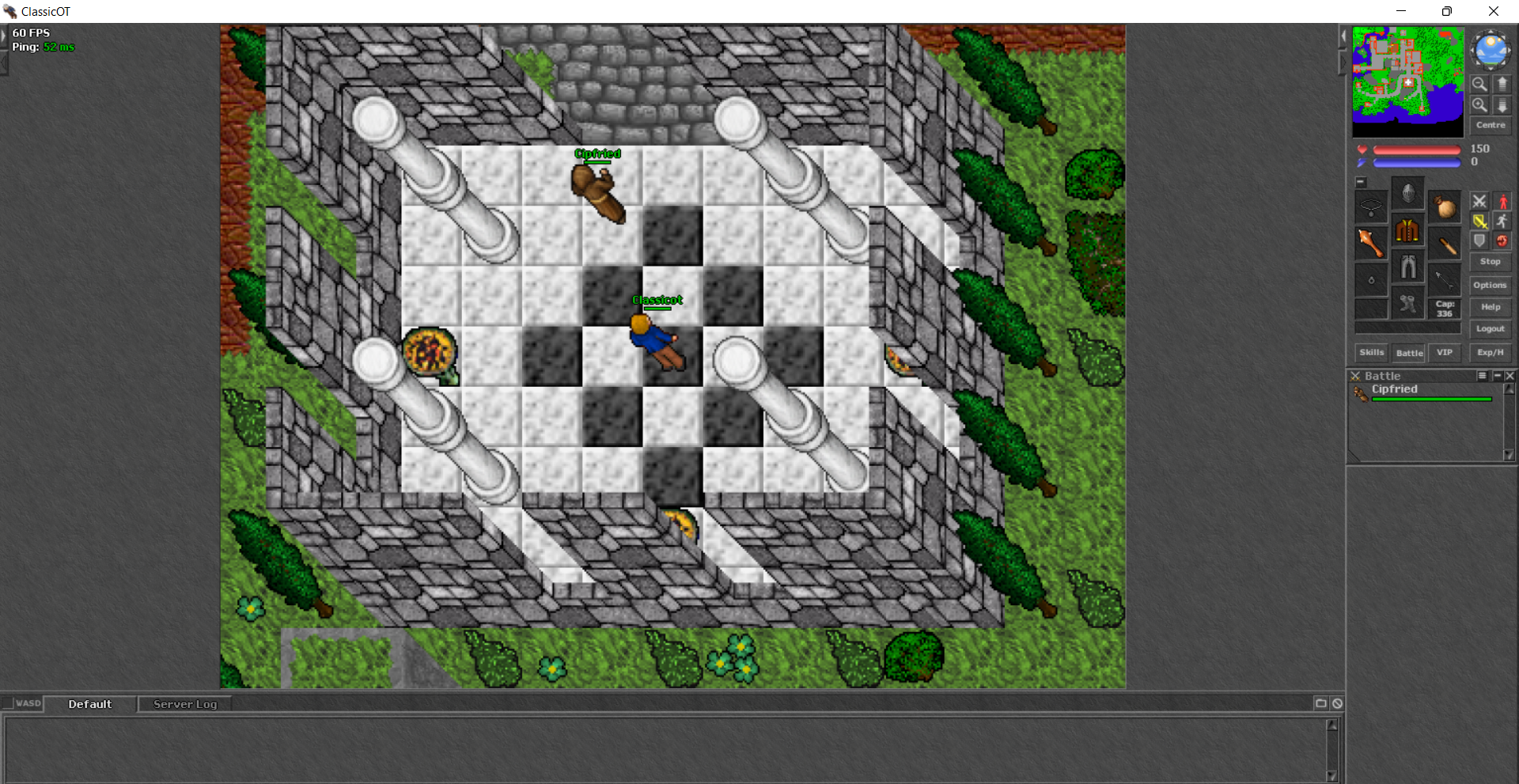
 | Game Window |
| The game window is where most of the action is taking place. The game window shows a part of the world of ClassicOT, with your own character in the middle. | |
 | Automap |
| Much like a radar screen, the automap will show you an overview of your surroundings. In the beginning a large part of this map will be dark since you need to explore the area first. The map buttons to the right will allow you to scroll around on the automap. | |
 | Status Bars |
| The status bars show your current hit points (red) and magic points (blue). Note that in the beginning you will have no magic points at all. | |
 | Inventory |
| Right below these bars you can see your inventory. It is divided into several slots for different body parts. Please note that you can put items only in the slot they are designed for, i.e. you can place a shield in your character's hand, but not on his head. The top right slot is reserved for containers such as bags and bagpacks. | |
 | Combat Controls |
| The combat controls consist of six buttons. They determine your character's behaviour in battle. | |
 | Buttons |
| Several further buttons are arranged next to or below the inventory screen. Some of them ("Menu" and "Help") will open up menus, while others (such as "VIP" and "Battle") will open up sub-windows. Clicking on "Stop" will cause your character to stop any action it is currently taking, while the button "Logout" will end the game. | |
 | Console |
| At the bottom of the screen you will find the console through which you can talk to other players. Communication is organized in different chat channels which can be activated by clicking on the little button with the file card in the top right corner of the console. | |
3. First Steps
Choose Your Character OutfitYou will start your adventure in the temple of the little village of Rookgaard. However, before you can do anything else you will be asked to select your character's outfit. You can choose your favourite adventurer from several different figures. Also, you can customize your character even further by painting individual body parts with the colour of your choice.
Context Menu
Once you have finished designing your character your should look around. You will find that you are not alone in the temple. There is a priest called Cipfried who is ready to welcome you in ClassicOT. Right-click on him. A context menu will open up in which you can select several options such as look, use, follow and even attack.
Talking to Inhabitants
But then, surely you would not want to attack a peaceful old priest such as Cipfried! He is a friendly old man who enjoys introducing people to the world of ClassicOT. You should talk to him because he can give you valuable tips on what to do and where to go. Simply enter hi or hello and hit the enter key. Cipfried will answer you. Now you can ask him about many important topics such as help, gold or equipment. If you are seriously injured he will heal you.
Moving Your Character
Among other things, Cipfried will surely advise you to go and fight some monsters. This is good advice, and you should heed it. Leave the temple and go north. To move around simply left-click on the spot in the game window you want your character to go to or use the arrow keys.
Diagonal Movement
ClassicOT world is much different than any other tibia server out there by that you should know this version doesn't allow you to use diagonal movements like the traditional tibia does, here on ClassicOT you need push yourself between trees or anywhere you want to use diagonal pathing.
Your First Kill
The sewers of Rookgaard are infested with rats. Look around until you find one, then right-click on it and select "Attack". The ClassicOT rat is a nasty little critter who can inflict painful wounds with its sharp teeth. Don't be afraid, though - a few well-aimed blows with your club should be enough to send it to its ancestors.
Looting Monsters
Once you have killed a rat you should right-click on its corpse and select "Open". With a bit of luck you will find some gold pieces or a useful item. To take items left-click on them and drag them onto the bag in your inventory. To check the contents of your bag right-click on it and select "Open".
Experience Points and Skills
However, gold is not the only thing you will get if you fight monsters. For every monster you kill you will get experience points. If you have gathered enough experience points your character will advance in level, which will make him faster and stronger in a number of ways.
Buying Equipment
Once you have saved a bit of money you should invest in better equipment. Make sure to visit shops and ask what they have on offer. You will find those rats will be much easier to kill with a good short sword and a trusty shield in your hands. A rope is another useful item you should buy as soon as possible.
Trading
If another player agrees to trade with you you can do so by using a special trade mode. Simply place your character next to the player you want to trade with. Right-click on the item you would like to trade and select "Trade with ...". The cursor will turn into crosshairs.
4. Mastering Rookgaard
General HintsYour first aim should be to make your character as strong as possible. The village of Rookgaard and its surroundings are exciting places filled with secrets and adventure, but you should be wary - there are worse monsters in ClassicOT than rats!
Death
Don't be too frightened to go out and to explore, though! Soon, killing a rat will be a trifle and, frankly, a bit boring, so you should move on to meet new challenges. Remember the worst thing that can happen to you is death - and death, thankfully, is not the final matter in ClassicOT it is in real life.